

Many of you have got most likely been using Windows seven for quite a moment currently. It’s extremely quite a solid operating system, with stability and functionality so much exceeding anything Microsoft has offered before. You may, however, be unaware of one of the good productivity blessings that Windows offers you. which’s keyboard integration, that is much a lot of advanced than other platforms like Mac OSX. Windows is entirely purposeful while not a mouse cursor, and indeed several options is accessed a lot of faster through the utilization of keyboard shortcuts. Hopefully the shortcuts below are of use to a number of you. i do know I learnt a number of new ones when researching this article!
1. Ctrl + Shift + Click – Open a Program as Administrator

With stricter security under Windows 7 comes the need to occasionally open programs as the Administrator user. Usually you need to right-click and then select “Run as Administrator”, but with this short-cut, you can avoid that step.
2. Shift + Right-Click on a Folder for a Command Prompt

This is very useful if you like using the command prompt. If you shift+right-click on a folder, a new option will appear to “Open command window here”. Clicking on that will open a command prompt at that location.
3. Windows-button + Number – Select Taskbar items

Pressing the windows-button and a number from 0-9 will select an item on the taskbar (0 is equivalent to 10). Potentially a fast way of switching between applications that you are using for keyboard input. For example, you could use it to switch focus between two open documents.
4. Ctrl + Shift + N – Create a New Folder in Explorer

This doesn’t really need much more of an explanation, basically as an alternative to clicking the menu item for a new folder.
5. Shift + Right-Click – Extends the Send-To Menu
If you right-click a file in explorer, there is a “Send to” option in the menu. Within that menu are a number of locations, which the file can be sent (copied) to. By using Shift+Right-click, this menu is expanded to include a number of other user locations.
6. Ctrl + Shift + Escape – Open Task Manager

Brings up the task manager, without the need to press Ctrl+Alt+Del first. Task manager is a useful Windows utility that, among other things, allows you to end unresponsive processes.
7. Windows-botton + Pause – Open System Properties

Opens the system properties window. Neat right?

8. Windows-button+B to Focus on System Tray

Focuses on the system tray, which then allows you to use the arrow keys to navigate it. Hit the Enter key on the little up arrow to expand it.
9. Shift+Click on Taskbar Item to Open Second Instance
If you want to open more than one copy of a program in your system tray, simply shift-click on the icon. This does not work for every application, only those which allow multiple instances. E.g. Internet browsers, explorer, Notepad, Wordpad.
10. Windows-button+Space to Show the Desktop
Essentially the same as clicking the little tab in the right hand corner of the taskbar, it will show the desktop by hiding active windows.
Hopefully some of you will find these shortcuts useful.
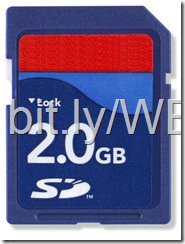
Note: This trick solely works on 1GB memory card.
1. First empty your memory card and store your data in different media or on your laptop.
2. Download Skymedi-2GB-Fix-Software given at the end of this post.
3. Right click on file 1GB_to_2GB.exe and choose “Run as Administrator“.
4. choose the drive from the drop down menu you would like to mend.
5. In image below you'll see that software in showing the memory card house that is 955 MB.

6. Simply click on Fix button to start the conversion process and click Yes button.

7. Congratulations you have successfully converted a 1Gb memory card to 2 GB.
Download: Skymedi-2GB-Fix-Software

For people who don't have accounts on servers like RapidShare, Megaupload, Hotfile, Netload, FILESONIC, EASY-SHARE, Megashares, I bring an answer in order that they will download as premium & conjointly watch movies that are hosted on these servers, & are compressed in to . rar will read them on-line or download on to your hard drive & no waiting best.
Remember: to look at some movies on-line you'll need to use DivX Web Player or Quicktime. The films will realize them here or in FullPelis.com with identical download servers avaible.
Website: fetch.io
Boom – this is one word which late Steve Jobs used to say very often. He seem to have used this word Boom in most of his presentations, interviews and talks. I am sure, you would know this, if you have seen any of Steve’s 
With this nomination Jobs may become the first deceased “Person of the Year winner” in the history of this prestigious pageant. Steve Jobs was nominated by Brian Williams. This Williams, who works for NBC News as well as Time-panelist, described the nomination as a Job wereldveranderaar that man is a piece of glass and plastic in a new way revolutionere allowed use.

Besides Steve Jobs also received Senate kanidaat Elizabeth Warren and Muhammad Bouazizi nomination. Latter led to nationwide protests earlier this year in Tunisia after a suicide attempt in despair. Bouazizi round a university degree program but failed, like so many in Tunisia, not in a good job. Alternatively, he goes on the street selling fruit and vegetables. However, his belongings in an audit conducted by the police what drives him to attempt suicide. Bouazizi pour himself with gasoline and then stabs himself on fire. The newly 26-year-old boy dies of his injuries shortly afterwards. This act subsequently leads to protsten country against unemployment.
The outcome of this election will be announced in December. Last year, Facebook founder Mark Zuckerberg is a prestigious title to get. Julian Assange and the Chilean miners last year, finished as runners up after Zuckerberg.
Most Viewed Video About Steve Jobs BOOOM!
The iPad pro is a powerful version of the iPad with a real widescreen, built-in net camera and a full keyboard.

With iPad pro, you'll be able to do heavy-duty tasks like editing videos, it's USB ports thus you'll be able to directly attach Flash drives and digital cameras with none accessories, it supports the Adobe Flash Player thus you'll be able to watch movies on Hulu and there's a built-in DVD drive thus burning data is possible.
The best half is that you simply can purchase the iPad pro at once from any Apple Store worldwide - it's alittle dearer than the iPad. image credit: Page71.
Matt Cutts, in a video, explains that photo-only sites can enable comments around their picture pages like Flickr. The picture itself may not have any text but the comments from readers will give Google a nice suggestion of what that whole page is about.
However the story is very different in the case of picture blogs or picture news sites that have an awesome collection of pics but very tiny text. How do they rank in Google when there’s no text.
Google depends heavily on text and incoming links to choose the rating of web pages in search results.

Matt Cutts, in a video, explains that photo-only sites can enable comments around their picture pages like Flickr. The picture itself may not have any text but the comments from readers will give Google a nice suggestion of what that whole page is about.
Google and Microsoft both have money, hunderdes of workers and much more offices, Google VS Microsoft who do you think will win?

Updated, should install and work on Firefox up to 3.5.x Download HERE
Well, I’m not going to get too heavily into the debate over whether or not to nofollow your internal links, but thinking about how I would go about doing it, I decided that it would be helpful to see all the links on the page, and if they were dofollow or nofollow links. So I present NoDoFollow, a simple firefox extension that highlights the links on the page, color coded according to their follow status.
The links in blue are DoFollow and the one in pink are NoFollow.Very easy to use.
Here is a screenshot of what it looks like when activated (Thanks, Matt Cutts. I knew I would find some nofollow links on your blog):

The extension installs into your tools and right click menu and highlights the links pinkish red for nofollow, and light blue for dofollow.
I hope that someone finds this useful. I have at least one friend who was asking for this since he wants to try and test using nofollow on internal links.
One of the first black and white games was electronic tennis, invented in 1958. It wasn’t until 20 years later that Galaxian came out as the first game to use RGB colors.
Sega, released in 1985, brought 32 on-screen colors to gaming fanatics and the Sega Genesis came out four years later with 64 colors, but the ante was upped with the Sony Playstation that had 16.7 million colors came out.
This year’s Call of Duty: Black Ops and Modern Warfare 3 have taken advantage of modern technology and feature over 16.7 billion colors, including color blind assist to aid those with color blindness.

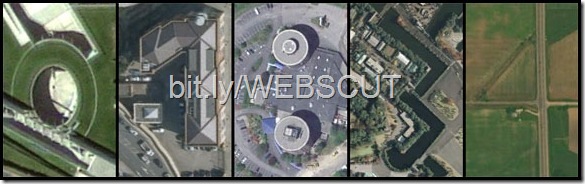
The Google Earth Clock is a live clock that displays the current local time in your browser using satellite imagery from Google Earth / Google Maps.
It picks the aerial view of buildings around the world that resemble numerical digits and uses them to represent the hours and minutes of this self-updated clock. Like the regular Google Earth software, you can also drag or zoom around using the mouse to explore any of five “numeric” areas in greater detail.
An impressive experiment (see video) though you do need the Google Earth plugin to view this clock in your browser. H/t Google Maps Mania.

Google uses special logos (or doodles) to honor famous personalities, especially artists and scientists, on their birthdays. And they do something similar on your birthday as well.
{Spoiler Alert} If you visit the Google homepage on your birthday, you’ll find a special logo and when you hover the mouse over that logo, it will greet you with some personalized text.
It probably picks the date from your Google Profile and you’ll also need to be logged in to your Google Account to see that birthday logo. The feature has been around for an year now but if you jumped in late like me, do remember to visit google.com on your next birthday.
And here’s wishing Manan Singhi a very happy belated birthday. Thanks for the screenshot.

The new Apple Macbook Air is so light that it literally flies away when you are not using it. If you don’t believe it, see the following video:
This video was done by Zach King and today he released another behind the scenes video that reveals how the flying Macbook Air effects were actually created. Nice!
If you’re using Windows 7 and if you’d like to get a taste of Windows 8′s interface and features, some third party programs can let you make Windows 7 look like Windows 8. These enhancements are definitely not top-notch, but they can still prove to be nifty nonetheless.
Let’s take a look at some free software that help you make Windows 7 look like Windows 8.
Get Windows 8-like Taskbar User Tile in Windows 7
Windows 8 comes with an enhanced taskbar that shows the current user’s picture near the notification area of the taskbar. Clicking on it, one can quickly access options to modify user account settings.
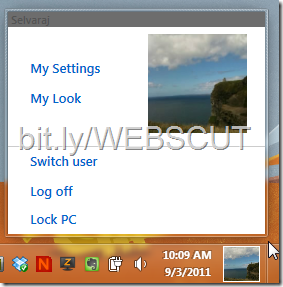
Taskbar User Tile is a neat little program that puts your user picture in the Windows 7 taskbar, just like it appears in Windows 8. The tile is displayed between the date/time area and the show desktop icon in the taskbar’s bottom right. In case you find the display of the user tile buggy or just want to turn it off, just right click on the picture and choose ‘Close’ to make the tile disappear.
Add Windows 8 like Metro UI startscreen in Windows 7
Windows 8’s Metro UI is getting a lot of buzz and if you’re a fan, you can get the same in Windows 7 using Omnimo. It’s a Rainmeter skin that brings the Metro style widgets to Windows 7.
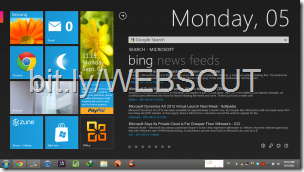
Download Rainmeter from here and then unpack the Omnimo skin. There are a couple of free Metro UI enhancements for Windows 7 but none of them match the level of professionalism and customization offered by Omnimo.
Get Windows 8 Aero Features in Windows 7 With Aura
Windows 8’s Aero glass color scheme changes based on your desktop background or active window icon. Aura does the same thing for Windows 7, and in addition, it lets you set the Aero color based on the icon of the currently active tab in Internet Explorer 9.
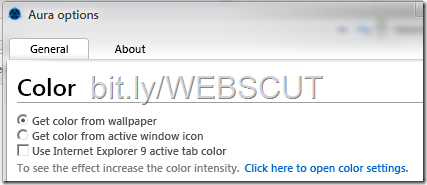
The changes will be noticeable only if you increase the color intensity from ‘Appearance and Personalization’ settings, as the Aura program advises.
Download the Windows 8 Transformation Pack for Windows 7
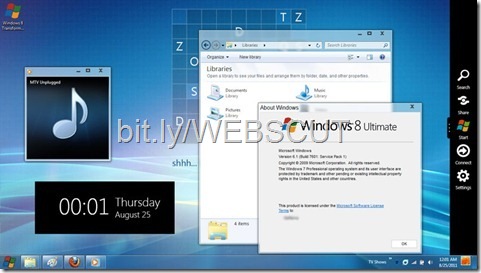
Previously reviewed Windows 8 transformation pack for Windows 7 makes a ton of changes to make Windows 7 resemble Windows 8’s interface. Besides just changing the start menu and window close buttons, the transformation pack also adds a slew of other features, including Metro UI and user tiles to the taskbar.
In the next few months running up to Windows 8′s release, there are going to be a ton of free programs coming out that help you emulate Windows 8′s best features in other Windows editions, Windows 7 and may be even Vista and XP. Bookmark this post as we keep updating it with more interface enhancement apps.
Are you looking for funny quotes for you status update on Facebook? The ones that will make your friends laugh? 
Beside the tips and quotes listed on this page there are also a few very cool and useful links to some other great sites where you can find a lot more funny and awesome ideas for Facebook status updates. Be sure to check them all out! And if you know another one please submit it in a comment! Thanks!
Awesome ideas for Facebook status updates
cool facebook statuses
- Some things man was never meant to know. For everything else, there's Google.
- Aaah! Finally I got a password for my computer other than just "password".
- One should learn how to save water! Go and shower with your neighbor's daughter.
- Have you ever had a fly land on your computer screen and your first
reaction is to try and scare it with the cursor? (I don't know about
you, but I have done this a couple of times). - %u2026isfaci ngamaj orprob lemwi hisspa cebarple asehelp.
- Be nice to nerds. Who knows probably you will be working for them one day.
- I do give the waiters a good tip, but they never seem to take or appreciate my advice.
- Dear Lord, please give me some patience NOW! NOW! NOW!
- Oh hello! I see that the assassins have failed.
- Making some changes to my life. Please leave a message and in case I don't get back, then know that you are one of the changes.
- At the airport customs, if you are asked "do you have any firearms with you?" never reply, "Why? What do you need?"
- What do I do when I see someone extremely gorgeous? I stare, I smile, and when I get tired, I just put down the mirror. Simple!
- Not all men are fools. There are still some bachelors.
- ..is dead. Yet here you are reading her update. What does that make you?
- ... is a big mystery that you can never solve.
- I said 'no' to drugs, but they simply would not listen.
- ... does not suffer from insanity. She is enjoying every minute of it.
- I am proud of myself. I finished the puzzle in just 6 months while the box said 2 to 4 years.
- ... thinks that if your relationship status is "it's complicated", then it's high time that you change it to 'single'.
- My computer beats me at chess. So what? It was no match for me at kick boxing.
- ... is color blind but is still trying to solve a Rubik cube. This could take a while.
- Women who seek to be at an equal level with men, lack ambition.
- Is swearing to drunk that he is not God.
How to be Popular on Facebook
100+ Funny Facebook Statuses
- Bought some batteries for my children as Christmas gift and it has a note that says 'toys not included'.
- Always borrow money from a pessimist. He won't expect it back ever.
- Children in backseats cause accidents - Accidents in backseats cause children.
- Always remember that stupidity is not a crime, so you are free to go.
- I think, and thus we have nothing in common.
- Statistically speaking, 8/6 people have trouble computing fractions.
- is wondering when can a chicken cross the road without being questioned?
- ... wants to kill the sexiest person alive, but suicide is a crime.
- ....went to the book store earlier to buy a 'Where's Wally' book.
When I got there, I couldn't find the book anywhere. Well played Wally,
well played. - Congratulations! You've just read this sentence.
- Where there is a will, there are 100 relatives.
- ... warns you to be careful with your head, cause once even he had an open mind until all his brains fell off.
- A guy knocked on my door today asking for a donation for the local
primary school's pool. I went away and came back with a cup of water%u2026..
Is that wrong?
Facebook Vs Google Plus [Infographic]

Please note: This guide is dated and I would recommend using the new Facebook Javascript API for this functionality. Check out this guide on the Facebook Developer site.
I have spent countless hours searching the Developer forums and reading over the wiki and haven't found a single, all-encompassing source that describes how to properly use FB.Connect.streamPublish(). This article is geared towards iFrame applications, but the same methods are used for external web sites using Facebook Connect. Also, if you own a web design company, please take a minute and add it to The Web Company Directory for free!
First, it is extremely important to have the proper connect settings.
1. Connect URL
Click the Connect tab in your application's settings, and set the Connect URL to your site's address with no ending / (i.e. http://www.ugadevelopers.com/frmatch).
(iFrame apps: Also ensure that you have set your Bookmark URL equal to your Canvas URL: http://apps.facebook.com/<yourapp>)
2. Cross-Domain Communication Channel
Next, you need to set up a cross-domain communcation channel so your Connect calls can send/receive info to FB. Enter this into a file and save it as xd_receiver.htm:
<!DOCTYPE html PUBLIC "-//W3C//DTD XHTML 1.0 Strict//EN" "http://www.w3.org/TR/xhtml1/DTD/xhtml1-strict.dtd">
<html xmlns="http://www.w3.org/1999/xhtml">
<head>
 <title>Cross-Domain Receiver Page</title>
</head>
<body>
 <script src="http://static.ak.connect.facebook.com/js/api_lib/v0.4/XdCommReceiver.js?2" type="text/javascript"></script>
</body>
</html>
Save this file into the same directory as your application. I saved it in the /frmatch/ directory.
3. Set up your page to make Connect calls.
In the file you are trying to make Connect calls in, you need the following code segments in the correct place:
3a. <html> tag
First, you have to include some special parameters in your <html> tag to let the browser know how to render the XML:
<html xmlns="http://www.w3.org/1999/xhtml" xmlns:fb="http://www.facebook.com/2008/fbml">
3b. FeatureLoader Javascript
Next, you need to include the FeatureLoader Javascript, which is responsible for loading the features necessary to make certain calls. (Note: You must place this line directly below the <body> tag!)
<body><script src="http://static.ak.connect.facebook.com/js/api_lib/v0.4/FeatureLoader.js.php" type="text/javascript"></script>
3c. streamPublish() call
Finally, we are ready to make the streamPublish() call. Here is a barebones script to test and make sure that everything is working correctly (don't forget to change to your api key):
<script type="text/javascript">
function publish() {
 FB_RequireFeatures(["Connect"], function() {
   FB.init('xxxxxxxxxx', 'xd_receiver.htm');
   FB.ensureInit(function() {
     FB.Connect.streamPublish();
   });
 });
}
</script>
<p>Stream Publish Test</p>
<a href="#" onclick="publish(); return false;">Post a story</a>
3d. Pop up dialog on window load
To pop up the feed dialog when the page loads (i.e. user lands on a high scores page and you present them a dialog to publish their high score), simply add the following script after the one above:
<script type="text/javascript">
window.onload = publish;
</script>
3e. streamPublish() with additional content
I assume most people want to display some content that is relevant to their app. Here is an example of attaching an image and a message to the post:
<script type="text/javascript">
 function publish() {
   var attachment = {     'name':'FriendMatch',     'href':'http://apps.facebook.com/frmatch',     'caption':'{*actor*} is playing FriendMatch!',     'media':[{       'type':'image',       'src':'http://www.ugadevelopers.com/frmatch/tile.png',       'href':'http://apps.facebook.com/frmatch/'     }]};       var action_links = [{'text':'Match Friends','href':'http://apps.facebook.com/frmatch'}];
   FB_RequireFeatures(["Connect"], function() {       FB.init('xxxxxxxxxx', 'xd_receiver.htm');         FB.ensureInit(function() {             FB.Connect.streamPublish('', attachment, action_links);           });       });   }
</script>
I hope this helps some people. FB's documentation of setting up this process is spotty at best!

Microsoft announced that is is giving out free stuff and discounts to those who install Internet Explorer 9. Obviously, Microsoft is trying to regain it’s popularity in the browser niche. It wants people to switch over from Firefox or Chrome or Opera to Internet Explorer.
Microsoft started an holiday campaign to give out freebies to attract more customers to use Internet Explorer 9. When I landed in Holiday Offers – Beauty of the web, I was greeted with a message saying “Where’s the love? You seem to be using Chrome 16. Upgrade to Internet Explorer to pin these sites to get free stuff.”
“To celebrate the holiday season this year, we’re excited to share a little gift to Internet Explorer 9 users – free stuff from sites you love.” says Scott Armstrong on Internet Explorer’s official blog.
Right now, ten sites have sponsored to provide free stuff. They are Slacker – Personal Radio, AOL Radio, Grooveshark, Hulu, Flixster, Fandango, Ticketmaster, Vimeo, Zynga and Pandora. After installing Internet Explorer 9, you will have to pin these sites to your taskbars to get the free stuff. The free stuff varies from $5 Fandango movie ticket to one month free usage of Hulu Plus to one free month of Pandora.
 Right now only two offers are provided while the other offers will
roll out in the second half of November or in the early December. You
will also have to note that, that offers are applicable only to US
residents. If you are a non-US resident, you are unlucky.
To install Internet Explorer 9, you must be running Windows 7 in your computer. If you are using previous version of Windows or MAC or Linux, you will not be able to install IE 9 and inturn will not be able to avail this offer.
What are you waiting for? Go ahead and install IE9, pin those sites and get stuff from Microsoft for free. You might not be able to get this awesome chance once again. Choose your free stuff wisely. All the best!

This article explains how to render an XFBML request-form if you are using iFrames or Connect.
First, it is extremely important to have the proper connect settings.
1. Connect URL
Click the Connect tab in your application's settings, and set the Connect URL to your site's address with no ending / (i.e. http://www.ugadevelopers.com/frmatch).
(iFrame apps: Also ensure that you have set your Bookmark URL equal to your Canvas URL: http://apps.facebook.com/<yourapp>)
2. Cross-Domain Communication Channel
Next, you need to set up a cross-domain communcation channel so your Connect calls can send/receive info to FB. Enter this into a file and save it as xd_receiver.htm:
<!DOCTYPE html PUBLIC "-//W3C//DTD XHTML 1.0 Strict//EN" "http://www.w3.org/TR/xhtml1/DTD/xhtml1-strict.dtd">
<html xmlns="http://www.w3.org/1999/xhtml">
<head>
<title>Cross-Domain Receiver Page</title>
</head>
<body>
<script src="http://static.ak.connect.facebook.com/js/api_lib/v0.4/XdCommReceiver.js?2" type="text/javascript"></script>
</body>
</html>
Save this file into the same directory as your application. I saved it in the /frmatch/ directory.
3. Set up your page to make Connect calls.
In the file you are trying to make Connect calls in, you need the following code segments in the correct place:
3a. <html> tag
First, you have to include some special parameters in your <html> tag to let the browser know how to render the XML:
3b. FeatureLoader Javascript<html xmlns="http://www.w3.org/1999/xhtml" xmlns:fb="http://www.facebook.com/2008/fbml">
Next, you need to include the FeatureLoader Javascript, which is responsible for loading the features necessary to make certain calls. (Note: You must place this line directly below the <body> tag!)
<body><script src="http://static.ak.connect.facebook.com/js/api_lib/v0.4/FeatureLoader.js.php" type="text/javascript"></script>
4. XFBML Loader Javascript
Add this Javascript to make sure your fbml is completely loaded before it is displayed. Place this code below the FeatureLoader script.
5. XFBML<script type="text/javascript"> window.onload = function() { FB_RequireFeatures(["XFBML"], function() { FB.init('xxxxxxxxxxxxx', 'xd_receiver.htm'); FB.XFBML.Host.get_areElementsReady().waitUnitlReady(function() { document.getElementById("container").style.visibility = "visible"; }); }); }; </script>
Now you are ready to render XFBML in your iFrame or Connect application. To render an fb:request-form, place the following code block after the previous script:
<fb:serverFbml style="width: 755px;">
 <script type="text/fbml">
  <fb:fbml>
   <fb:request-form
      action="http://apps.facebook.com/frmatch/postadd.php"
      method="POST"
      invite="true"
      type="XFBML"
      content="FriendMatch Invite Form!">
    <fb:multi-friend-selector
      showborder="false"
      actiontext="Invite your friends to play FriendMatch!">
   </fb:request-form>
  </fb:fbml>
 </script>
</fb:serverFbml>
 Hit up the link below to visit Nokia Argentina for more information (or just drag these links for Angry Birds and Fruit Ninja to your bookmark toolbar).


